

- two wans
- lots of vlans
- 32vcpu hypervisor with gpu passthrough
- 25gbps san running off the nas
Everything I do is mostly with VMs, the hypervisor is diskless pxe booting off the SAN. I’ve been cleaning up my lab, it used to be a plank of wood https://discuss.online/post/44690398
There is a nanokvm hanging off the hypervisor (rs232,atx header, hid) which makes remote rebuilds quite painless. I love my inexpensive nanokvm.

What does your homelab look like?
You must log in or register to comment.

My chaotic evil setup
I like the whale tail! The chuwi is a low power pc? The clear plastic behind the speaker is another? Your doing wifi and wired right next to each other? KVM behind the PSP? NAS on the right?
I’m really new to all of this homelab rabbit hole, the clear plastic behind the speaker is my home assistant machine this where it all started, my wifi router is downstairs, all this mess is connected via the switch chose the home assistant machine everything is wired and not wifi m, the black box next to the left speaker is my old proxmox machine not used right now but stille there, (cause, why not?) chuwy is my proxmox machine next to it the big black box is my nas, “kgp behind the psp ?” I don’t event know what this question is about xD. I don’t know if my setup is a good way to do it, I’m just starting I have just internet to help me :) as of right know it look like it’s working but it can be just ork warhamer 40k magic, don’t really know how it really work but just have to believe. XD
That is awesome! it’s not a mess - it’s lovingly artisanal home made spaghetti!
that little chuwy is running vms? what kind of cpu do you have in there?
KVM behind the psp - is that a keyboard video mouse switching device behind your handheld gaming console?
it’s all magic, don’t let that magic smoke out!
Yes chuwy run vms with proxmox, it have an AMD Ryzen 7 CPU, more than enough for the moment (to be fair I bought is last month 😂) That keyboard is there cause I had issue with migration, everything is fine now but it is still there) the box behind my chuwi is Philips light box to synchronise light with my tv. It is not an homelab thing but since this happy mess is below my tv xD
also running VMs on your NAS?
Nop all’ vms on chuwi, storage for the vms are on the nas thos
deleted by creator
Two ONTs? Do you have two ISPs? You madlad.
Why have one when you can have two for just twice the price?
I always have at least two now, outages on one are a curiosity rather then a touch grass event.

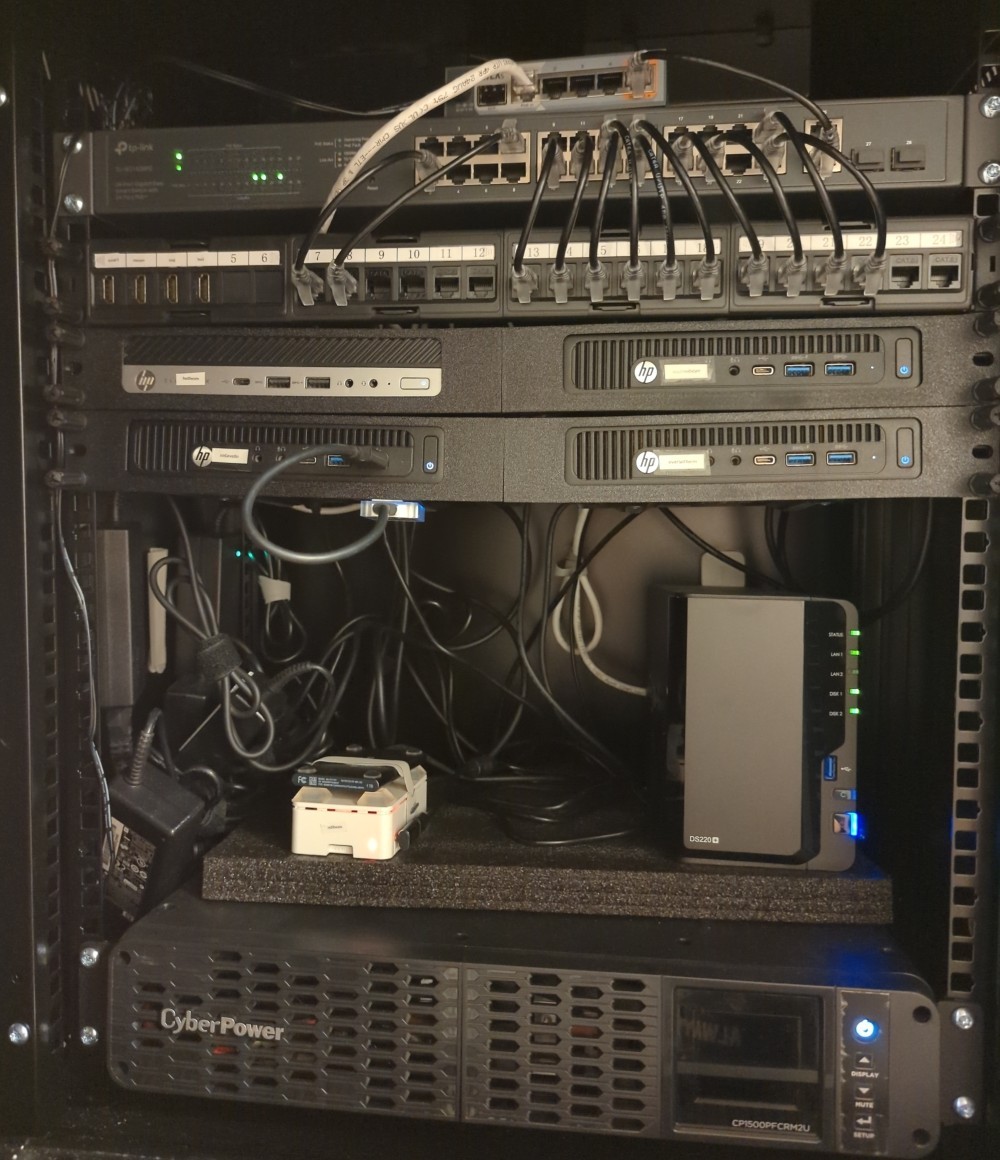
- Mikrotik router
- TP-Link PoE 24 port switch
- 3x HP ProDesk 600 G2 - 32GB RAM 1TB SSD
- 1x HP EliteDeak 800 G5 - 32GB 1TB SSD
- 1x Raspberry Pi 8GB - 1TB SSD
- Synology 220+ NAS -14TB RAID1
- Cyberpower UPS
3 ProDesks are kubernetes control plane nodes and the others are all workers. There are probably 250+ pods running on there. Sadly the UPS only provides about 20 minutes of power, but it keeps internet, WiFi, and cameras up too so its not too bad.
I really want to rebuild the NAS and build a beefy worker with a GPU but component pricea are just absurd.
Which Kubernetes distribution are you using? Which storage?
oh, i love the colours! Are your mini-pcs sagging in the middle? I think you might need a shelf!
The mikrotik gets external internet access from the while cable? You have a patch panel - that’s awesome.
128GiB of ram across your HPs! nice! What do you use all that memory for? 250 pods is impressive.
Why is the NAS sitting on foam? vibration dampening?
My UPS is only used to shutdown the NAS gracefully, if i lose power the whole thing goes off in 30s.
I really want to rebuild the NAS and build a beefy worker with a GPU but component pricea are just absurd.
Yeah, the intel arc gpus are not so bad, and they support sriov!
How many Watts does that pull on idle?
Not sure, but its about 240W right now (doing lots of nonGPU work)… the full stack all the devices (including the spinning rust and the printer)
Mine is a half filled 10 inch rack with a spaghetti mess of cables coming out of the back lol. I used to have a fairly robust setup but had to downsize. Now it’s one lenovo m75q-1 running a ryzen 3 pro with 32 GB of ECC, and two hard drives connected over individual USB adapters in a ZFS mirror lmao. Networking is a GL.iNet router with OpenWRT and a basic 5 port switch. Much more energy efficient than my old setup with two raidz2 pools connected properly via sata but definitely less redundant and on a much less powerful base, but i take backups and it’s enough power for my services so 🤷🏻 maybe one day I’ll add another tiny PC node and get my redundancy back that way

It’s grown and shrunk a lot the past 8 years of homelabbing.
- 14c/20t CPU
- Main storage is 78TB in Z1 (50ish TB usable)
- 3 active VMs
- 5 VLANs
- Handful of 1G/2.5G switching ports
- Nearly everything is PoE as the gods intended
- 1 Meshtastic node that’s not visible
- 1 5G/LTE modem that’s not plugged in
- Router is a Mikrotik RB5009UG+S+IN
- Switch is a Unifi USW Enterprise 24 PoE
Adding an OPNsense Firewall soon, just to mess around with some sort of dynamic firewall capabilities.
That rack is a thing of beauty.
14c/20t CPU
How does that work? 1.4 threads per core?
Nearly everything is PoE as the gods intended
Do you have that many poe devices?
Adding an OPNsense Firewall soon, just to mess around with some sort of dynamic firewall capabilities.
That sounds cool, but can’t you do most of that with the mikrotik router you have already?
You have a fiber uplink leaving the switch, does it go to the hypervisor?
I know on some of the more modern intel CPU’s they run something like a big.little system, where there’s a number of “performance” cores and some “efficiency” cores. Often it’s just the performance cores that will have hyperthreading, leading to a whacky thread count compared to physical cores.
It’s the strange Intel CPUs with the 1c/1t efficiency cores. (i5-14600k)
I have PoE cameras and wifi points. The meshmastic node is also PoE.
MT will loose all of the historical data each time your reboot it. And MT seems to push updates quite often.
Additional I can at least have community rules for IDS/IPS. MT only has a basic stateful firewall abilities.
The fiber uplink actually goes to my warm backup server. That gets turned on every few months to so to take a backup from the main server. It’s 160TB raw.
I have a Lenovo M700q on a shelf in the pantry. That’s it!
Which hypervisor did you use that can pxe boot? Neat idea
The hypervisor is just nixos running kvm and incus - it doesn’t have any opinion about pxe booting; So pxe gets dhcp from the san, which supplies the bootstrap, which is a tpm wrapped luks volume, which supplies the iscsi target, which bootstraps nixos over iscsi… Once the nixos kernel loads anything goes, so KVM isn’t aware of the iscsi nature of the diskless system at all.
I did play with nixos -> xen, but nested virtualization wasn’t a thing with xen yet, so i went back to KVM. incus over libvirt so i can have a proper hypervisor API, so i can have projects with different credentials and scopes creating and destroying VMs willy nilly.
How are you finding incus?
I’m intending to move from proxmox to incus, but as it has Home Assistant on, it feels like we’ll be going back to the stoneage whilst it’s down and hardware costs are too high to get a 2nd box at the moment.
I’m very happy with it; it works well, has good control of different projects, allows limited api access to different vlans; supports clustering and live migration. I haven’t found anything I can’t do with incus that I can do with libvirt. it is surprisingly mature.
I do have a second machine, so I have juggled VMs around when i played with different hypervisors. You can always take a disk image of your home assistant and restore it in incus.
deleted by creator
yeah, its just a gateway router with multiple wan inputs (up to 3), it does dhcp, routing, vpn termination, and manages all the vlan segmentation and cross routing.
What is “cross routing”?
vlans don’t route to each other, you need a device that routes between vlans (if you want traffic to cross)
vlans don’t route to each other
Well, yeah. VLANs work at layer 2. What you are routing is the subnet you assigned to each one.
I just have never heard the term “cross routing” in my 30 years of networking.
Fair enough - how would you describe it?
I would just say routing.
It’s most common to associate a vlan with a subnet for sanity, so i think “routing vlans” would be understood.

- Freebox — ISP box, in bridge mode
- OPNsense — firewall/router, running on a Topton mini PC
- MikroTik CRS310-8G+2S+IN — core switch, RouterOS 7.24.2
- TP-Link EAP225 — WiFi AP (trunk, native VLAN 10)
- Proxmox — hypervisor on Blackview MP100
The MP100 has some NIC issues, so I wouldn’t recommend it. Next thing I want to get is a NAS, but man oh man, storage prices are… atrocious.
but man oh man, storage prices are… atrocious.
It’s crazy right now
I hope it’s gonna go down soon but I know that it’s not